Webhook Integration
The Integrations Bot uses a webhook to connect your Payhip account to your Discord server. This allows you to receive real-time notifications for sales, refunds, and subscription events directly in your Discord channels.
How It Works
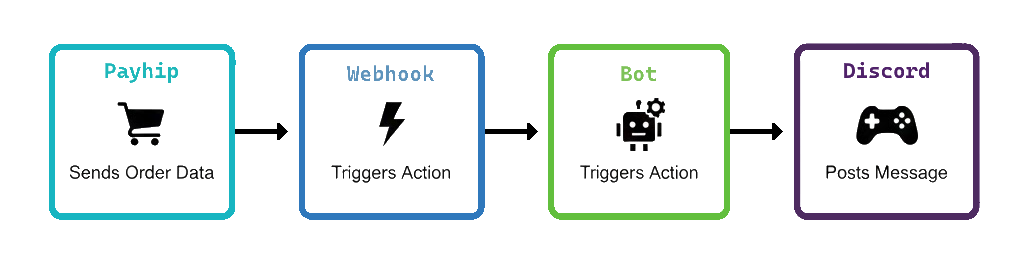
- Payhip Event: A customer makes a purchase, requests a refund, or starts/cancels a subscription on your Payhip store.
- Webhook Triggered: Payhip sends a POST request to your configured webhook URL (see Setup Guide).
- Bot Receives Event: The bot's Express server receives the event at the
/webhook/payhipendpoint. - Event Processing: The bot parses the event, updates the database, and posts a formatted embed in the appropriate Discord channel.
Supported Events
- Sale Completed (
paid) - Refund Issued (
refunded) - Subscription Created (
subscription.created) - Subscription Canceled (
subscription.deleted)
Other event types may be ignored or logged for future use.
Example Event Flow
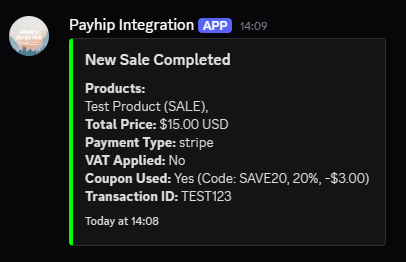
- Customer buys a product on Payhip
- Payhip sends a
paidevent to your webhook URL - The bot receives the event and posts a "New Sale Completed" embed in your sales channel
Security Notes
- The bot ignores test payloads (signature starts with
test) - Only events from your configured webhook URL are processed
- Make sure your webhook URL is kept private if possible
Customization
You can customize which events are sent, the embed colors, and the Discord channels in your config.json file:
{
    "discordConfig": {
        "salesChannelId": "...",
        "refundsChannelId": "...",
        "subscriptionsChannelId": "..."
    },
    "embedColors": {
        "newSale": "#00FF00",
        "refund": "#FF0000",
        "subscription": "#0000FF"
    },
    "payhipConfig": {
        "eventTypes": {
            "newSale": true,
            "refund": true,
            "subscriptions": true
        }
    }
}
For setup instructions, see Webhook Setup. For command usage, see Commands.